All Formats Video Converter Software - Covert your videos to any format
All Formats Video Converter Software allows you to easily convert your video files from one format to the next. The simple to use software works quickly and preserves original quality quite well. This app is great for those times when you use video editing software that supports only limited file types and need to convert them. All in all this application is great for anybody who often works with videos.
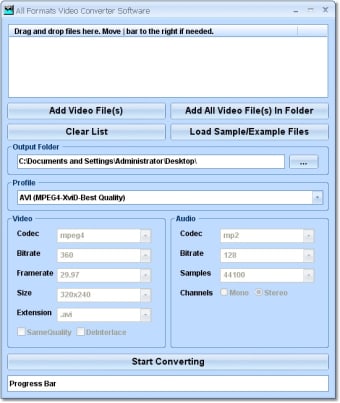
This software offers a solution to users who want to convert videos from one file format to another. Can't find the right codec pack to watch a clip? Convert it! Does your video editor limit your save options? Just select the target file and choose a standard format profile or create your own custom format. This software offers a wide variety of built-in video and audio codecs to build the video with the bitrate, framerate, resolution, and extension you need. Standard output profiles are: AVI (MPEG4-DivX-Compatible), AVI (MPEG4-DivX-Best Quality), AVI (MPEG4-XviD-Compatible), AVI (MPEG4-XviD-Compatible), Animated GIF (64x48) GIF, Animated GIF (160x120) GIF, Animated GIF (320x240) GIF, Animated GIF (Same as Input) GIF, iPOD Video (320x240)
This software has a straight-forward installation process and instructions. It also has a well-done, easy to understand interface and has won multiple usability awards.
Laws concerning the use of this software vary from country to country. We do not encourage or condone the use of this program if it is in violation of these laws. Softonic may receive a referral fee if you click or buy any of the products featured here.